
Cross-list, sync, and sell resale inventory from one workspace.
SECND is the cross-listing and inventory software for resellers. Turn product photos and existing listings into marketplace-ready records on web or mobile, then keep online channels and in-store stock aligned.
Use SECND on web or mobile for bulk listing, cross-listing, POS-aware inventory sync, auto-delisting, and team review queues.
Inventory queue
Review once, then cross-list to every selected channel.

1990s Fair Isle Zip Cardigan
Title, tags, category, and description drafted
$65

Guess Denim Trouser
Size field needs one operator decision
$22

Sherpa Lined Graphic Hoodie
Live channels are synced from one record
$45
Sync coverage
Connected channels inherit the same inventory source.
 eBay
eBay Depop
Depop Etsy
Etsy Shopify
 Grailed
Connect the places you already sell. SECND keeps product data and stock movement in one operational workspace.
 eBay
eBay Depop
Depop Etsy
Etsy Shopify
 Grailed
 Square
 Poshmark
 Instagram
Capture paths
Start from the way your team already shoots products.
SECND supports phone-first intake on mobile and the same full workspace in the browser—identical tools, whichever fits your team.
Capture from the shop floor
Use the iPhone app when your team photographs products as they come off the rack, then finish review and publishing in the web app.
- Take product photos on mobile
- Start listing drafts immediately
- Continue in the web workspace
Work from the web app
Upload photo batches, review inventory in a dense grid, and publish across marketplaces from any browser—no desktop install required.
- Process large photo folders
- Review generated products in bulk
- Publish across selected marketplaces
Workflow
One path from intake to sold.
One day-to-day workflow: bring in inventory with the AI listing tool, review exceptions, and keep every marketplace channel honest with POS-aware inventory sync.
Bring inventory in
Upload photos, import existing listings, or connect the system your shop already uses.
Let SECND structure it
AI drafts titles, descriptions, categories, tags, pricing context, and marketplace fields.
Review the exceptions
Your team works from a dense queue and only fixes the items that actually need a decision.
Publish and keep synced
Listings go live across channels, and sold inventory is delisted everywhere else.
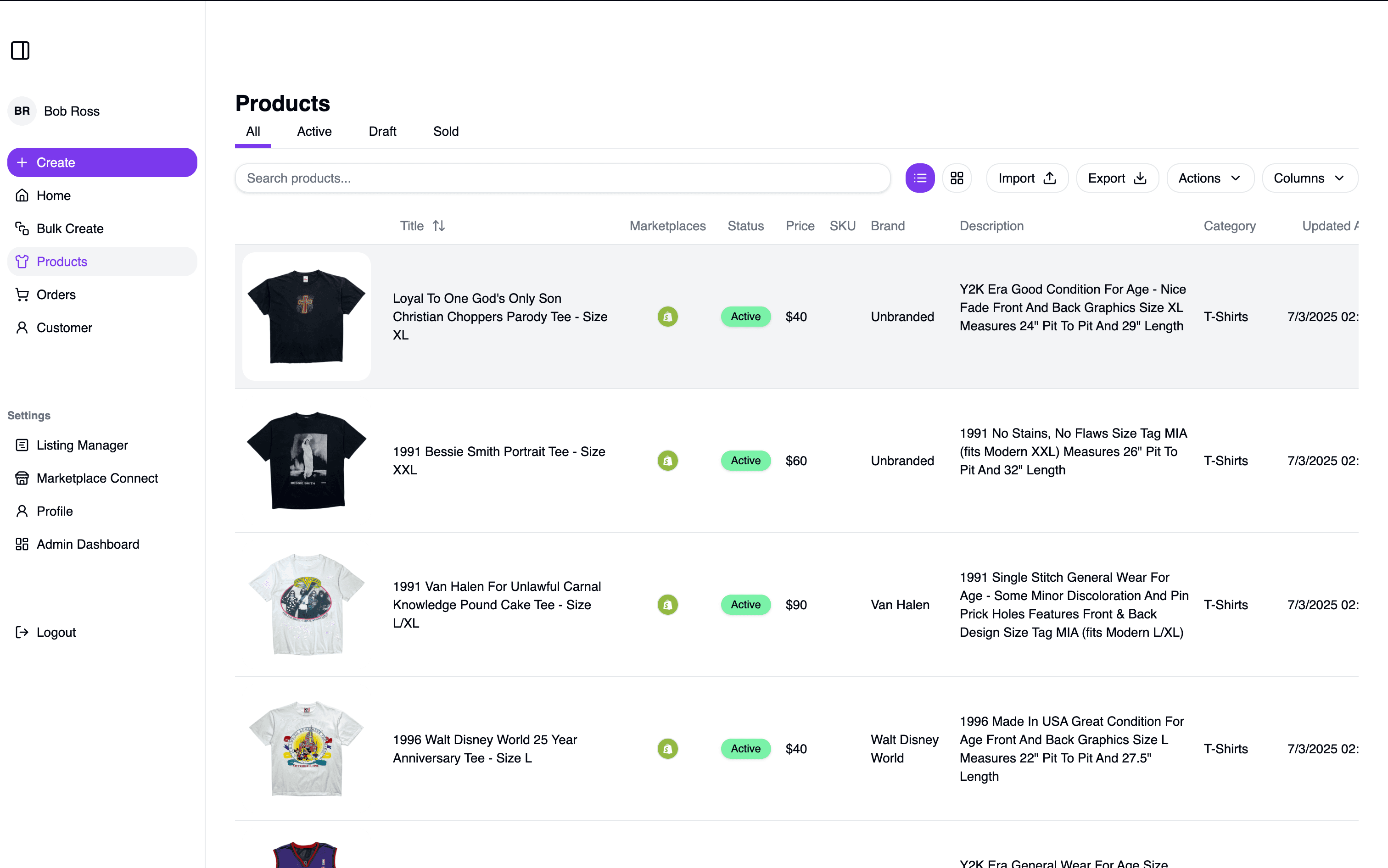
Product surface
Show the operating system, not another cross-listing promise.
The strongest proof is the product itself: inventory density, review states, channel sync, and useful AI assistance at the point of work.
100s
A review grid built for operators
Dense inventory controls, inline editing, column visibility, and status filters without page noise.
1 pass
AI where it removes work
Image understanding and listing generation sit inside the workflow instead of becoming another tool.
1 source
Physical and online stock together
Square, Shopify, and marketplace inventory stay tied to one product record.
Use cases
What SECND helps your shop do.
Bulk list new arrivals
Turn a rack, vendor drop, or photo folder into structured listings your team can approve.
- Group product photos
- Draft listing fields
- Queue only missing data
Cross-list with fewer tabs
Publish from one source record while SECND adapts fields for each marketplace.
- Channel-specific fields
- Shared price control
- Status by marketplace
Protect inventory accuracy
Connect POS and marketplace activity so sold items stop appearing where they are not available.
- Square and Shopify sync
- Auto-delist after sale
- Issue queues for exceptions
Give teams a cleaner workspace
Managers and operators can see what is ready, blocked, live, and worth reviewing.
- Dashboard status
- Attention queues
- Repeatable workflows
Questions
The common operational questions.
SECND is built for sellers who already have products, channels, and operational pressure.
What does SECND replace?+
SECND replaces the scattered listing workflow: photo folders, spreadsheet trackers, marketplace tabs, manual copy-paste, and after-sale delisting checks.
Compare SECND vs. VendooCan I import listings I already have?+
Yes. SECND can pull existing inventory from supported marketplaces, structure it in your workspace, and help you reuse it across other channels.
Read the import guideHow does SECND help physical stores?+
SECND connects online listing work with POS inventory context, so in-store sales can remove stock from online channels before a second buyer purchases it.
How inventory sync worksDo I still review listings before they go live?+
Yes. SECND drafts the repetitive fields and shows the exceptions, so operators stay in control without starting every listing from scratch.
See the AI listing toolCan I use SECND on web and mobile?+
Yes. SECND is a web app you use in any browser, plus an iPhone app for shop-floor photo intake. There is no desktop installer — sign up and start listing from any computer, then continue on mobile when you are sourcing.
Sign up freeWhich marketplaces are supported?+
SECND supports major resale and commerce channels including eBay, Etsy, Depop, Shopify, Grailed, Square, Poshmark, and more as integrations expand.
See all supported marketplacesStart
Make every listing start from one clean source of truth.
Create a free account to use SECND in your browser, grab the iPhone app for shop-floor intake, or run the ROI calculator to see what cross-listing time you can win back.
Contact Us
Reach Out, Give Feedback, Explore Partnerships